Sunday, 18 January 2015

To all who call


The Lord is close to all who call on him, yes, to all who call on him in truth.

Psalm 145:18 New Living Translation

Healing is in your hand by Christy Nockels

:   :   :

Blessings to your week, 

Nina

Here's a printable
of Psalm 145:18
for you 


Sharing with: 


Photo: iPhone 5S, Camera+, Snapseed - Texture Scratchedmagic by Kim Klassen

Saturday, 17 January 2015

Highlights of my week


The tube scarf has been in the making a few months now - it is so cozy to knit in the evenings. I like these soft colors, the woolen yarn and the recipe for the scarf is a present from a friend of mine from her travels.


Cherishing the moments in the kitchen, as our boys are making sandwiches or helping around, like emptying the dish washer ... The saying "Kitchen is the heart of a home" makes sense with the pulsing life it contains.


I was about to catch a common cold with sore throat, headache, running nose ... I drank pots of green tea with thinly sliced fresh ginger and honey, and slept a lot after work - I cannot say which helped most - I'm grateful for not getting really sick.


Glaze and Brushstroke apps, and a texture Tableaux Old Style from French Kiss Studio Textures

We had the pleasure of having the sun peeking out Friday afternoon - Sunlight does make a great difference after a foggy and rainy week. The bluish and turquoise shades and the glimpses of sunlight playing on the water ... Yes, the time seemed to stand still, as we admired the vast sea, the far horizon and the open sky.


The scent of paper and Earl Grey ... Simple pleasures on Saturday mornings. 

... Is there a moment from this week that is still lingering in the back of your mind - what made it so special to you?


Wishing you a peaceful weekend,

Nina

Sharing with

Sunday, 11 January 2015

Beyond our hopes


 Now glory be to God, who by his mighty power at work within us is able to do far more than we would ever dare to ask or even dream of—infinitely beyond our highest prayers, desires, thoughts, or hopes.

Ephesians 3:20 Living Bible


Fall Afresh by Jeremy Riddle

:   :   :

Blessings to your week, 


Nina

Here's a printable
of Ephesians 3:20
for you 


Sharing with: 


Photo: iPhone 5S, Hipstamatic: Wonder-lens & Hackney-film, Texture 281 by Anna J. Lenabem

Wednesday, 7 January 2015

Create a Frosty Window-effect with Classic Vintage Photo Editor


Classic Vintage Photo Editor is one of my favourite mobile photo applications in creating silky and frosty effects to my iPhone photos. I will here show you can create a Frosty Window effect using Classic Vintage Photo Editor and Image Blender iPhone applications.

This is the original image, which I have taken with iPhone 5S, using the external Olloclip macro lens, that I attached to my iPhone for taking this close-up photo.


Tutorial: 9 Steps to Create a frosty Window-Effect

Open the photo you wish to edit in the Classic Vintage Photo Editor. You will see that the app will automatically apply random effect layers on your photo - You need to start with setting the effect of these layers to 0% opacity: 

1. As shown below, choose the Sepia effect, and adjust it to 0% opacity.


2. Then, in the same way, choose the Border effect, and adjust it to 0% opacity.

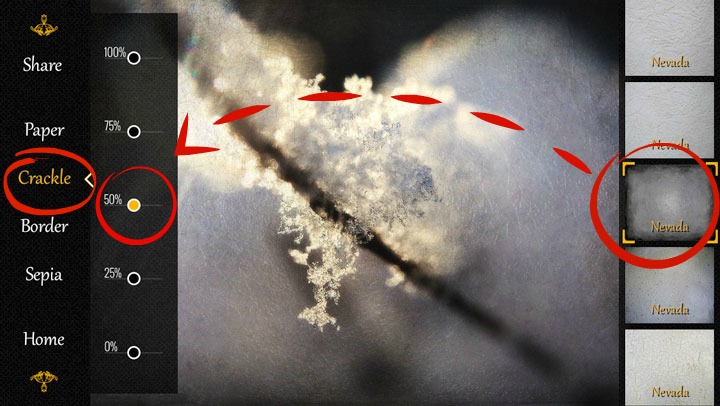
3. Now choose the Crackle effect, and choose the Nevada layer from the right (shown below - number 8 from the top), and adjust the opacity of the layer to 50%. 


4. Do the same with the Paper layer - Choose the Nevada-effect shown to the right, that is, number 2 from the top, and set it also to 50% opacity. 


5. That was easy, wasn't it! Now you have finished editing your photo in the Classic Vintage Photo app, and it is time to save the photo on your camera roll: 
Choose Share, and photo library - now your image is saved in the camera roll of your iPhone.


I wanted to remove the frosty effect from the middle of my photo - to get the sharpness and clarity of my original image to the center point - and I used Image Blender app for this. 

So from now on, we proceed in the Image Blender app:

6. Open first your original image in the Image Blender app, by clicking the icon in the lower left corner - your camera roll opens, and you can now choose your original image.


7. Then click the lower right icon, and choose the Frosty Window from your camera roll.


8. Choose the Mask option, and remove the Frosty Window effect from the desired area of your photo. Click the Save option in the upper right order. 


9. Then set the opacity continuum all the way to the right, so you can see the Frosty Effect photo, now with a clear and sharp (your original image) being visible in the middle - and save your image to your camera roll.


And, that's it - 9 easy steps to create a beautiful, winter image ... Like looking through a Frosty Window. This is my favourite combination at the moment in Classic Vintage Photo Editor.


What are your favourite apps at the moment? 

Come and link your recent mobile photos to App Happy Wednesday hosted by Barb at Keeping With The Times.

... With App-Happy greetings,
Nina


Classic Vintage Photo Editor is at the moment free in the App Store. Image Blender is available in App Store for $ 2,99. 


Monday, 5 January 2015

Simplify [One Word]


Instead of making New year's resolutions, I have chosen one word, that will be my point of focus throughout 2015. My earlier post shows glimpses of the impact of my word for 2014 - Unhurried - had on my life.

The word SIMPLIFY has been growing in my mind the past few weeks. Simplify was the theme in our church in November - since then, it has echoed in my mind and called for my attention. I look forward of having Simplify as my companion in 2015 - being curious of what kinds of fruit it will bring along the way.

Why Simplify?
I hope it will help me to focus to the essential - cutting the unnecessary away.
Less is more - practically as well as mentally. 
Not alone to achieve a simpler life - but also a process, in me.
It is sometimes the little things, that end up making a big difference - so let's see...

Quoting E. F. Schumacher, Any intelligent fool can make things bigger and more complex ... It takes a touch of genius - and a lot of courage to move in the opposite direction.  Well, since I am no genius, I must posses a whole lot of courage :-)

What are you hopes and wishes for 2015?

Until next time...
Nina


Sharing with: Texture Tuesday Roses of Inspiration   Saturday Share Fest 

Photo: iPhone5S, Olloclip-lens, Camera+ & VSCOcam Texture: Kim Klassen

Sunday, 4 January 2015

Safe pasture


Trust in the Lord and do good;
    dwell in the land and enjoy safe pasture.

Psalm 37:3

Kutless - What Faith Can Do (Official Music Video)


:   :   :

Blessings to your week, 


Nina

Here's a printable
of  Psalm 37:3
for you 


Sharing with: 


Photo: iPhone 5S, VSCOcam, Mextures Textures: 2 Lil' Owls Studio


Thursday, 1 January 2015

My Unhurried 2014 [One Word]


JANUARY


iPhone 5S, VSCOcam preset S3

Snow falling soundlessly in the middle of the night will always fill my heart with sweet clarity.


Novala Takemoto


FEBRUARY


iPhone 5S, VSCOcam preset X4

Creative moments inside, when it's cold outside.


MARCH


iPhone 5S, VSCOcam preset S5, Glaze

Father & Son - Just a walk


APRIL


iPhone 5S, Camera+, Fuzel Collage


Visiting my auntie in Paris together with mom - we had a lovely week together!


MAY


iPhone 5S, Camera+, VSCOcam preset S3

Whenever there is stillness there is the still small voice, 
God speaking from the whirlwind, nature's old song, and dance ...

Annie Dillard


JUNE


iPhone 5S, Camera+, VSCOcam preset S1

To part is the lot of mankind. The world is a scene of constant leave-taking, 
and the hands that grasp in cordial greeting today, 
are doomed ere long to unite for the last time, 
when the quivering lips pronounce the word - 'Farewell'.

R.M. Ballantyne


My last day at my former work place: Saying good bye to dear colleagues through the last 5 years - 

the last walk on the path along the field ... 
and reorientating towards starting at my new work.


JULY


iPhone 5S, Camera+

Summer holidays :)


AUGUST


iPhone 5S, Hipstamatic: Lowy-lens, Robusta-film

Until you spread your wings you'll have no idea how far you can fly.


Ray Bradbury


SEPTEMBER


iPhone 5S, Camera+, texture Privet from the  mobile collection by Love That Shot

Sit with me in the shade of these green trees, 
which have no weightier thought than 
the withering of their leaves when autumn arrives, 
or the stretching of their many stiff fingers 
into the cold sky of the passing winter. 

Fernando Pessoa


OCTOBER


iPhone 5S, Camera+, Stackables

Time stands still best in moments that look suspiciously like ordinary life.


Brian Andrews


NOVEMBER


iPhone 5S, Lensbaby LM-10 Sweet Spot Lens for Mobile, VSCOcam preset B4

Learn from yesterday, live for today,

look to tomorrow, rest this afternoon.

Charles M. Schultz


DECEMBER


iPhone 5S, Camera+, VSCOcam preset S1


From time to time, to remind ourselves to relax and be peaceful, we may wish to set aside some time for a retreat, a day of mindfulness, when we can walk slowly, smile, drink tea with a friend, enjoy being together as if we are the happiest people on Earth.

Thich Nhat Hahn


:   :   :


My One Word for 2014, Unhurried, has been a wonderful companion throughout this year. It has taken me to places of rest and quietness. It has helped me to slow down, and to focus on the things that matter most. 

I am grateful for all the moments, people, places, challenges, surprises ... in my daily life and here in blogging fellowships. I am thankful for each of my friends here on blog space, for having travelled along - sharing, inspiring and popping by ... 

Thank you for having been a part of my year - It wouldn't have been the same without you!


As we already have entered into 215, 
I am wishing you a Happy New Year -
With new adventures and moments to unfold!

Nina

//